

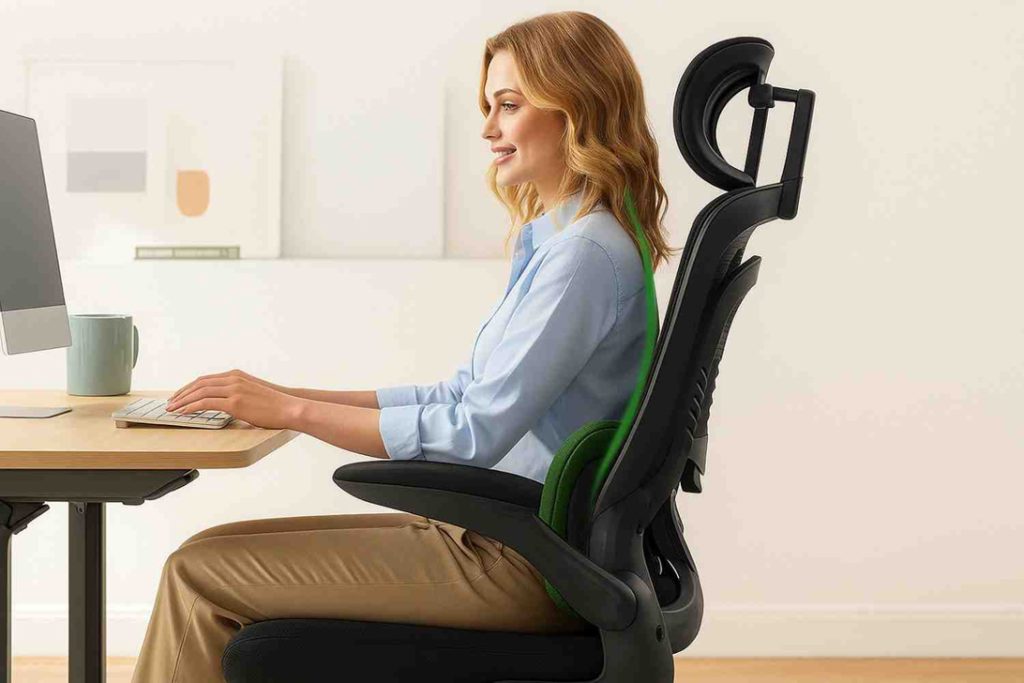
The modern work environment has tied daily routines to desks, screens, and stationary seating. The average adult spends between seven and ten hours per day seated, whether working in an office, attending remote meetings, driving, or relaxing at home. While human bodies evolved for dynamic movement, contemporary lifestyles demand prolonged static postures.
Standard, non-adjustable furniture forces the body to adapt to unnatural shapes, resulting in chronic spinal loading, restricted blood flow, muscle fatigue, and daily physical discomfort. Ergonomic furniture addresses this biomechanical mismatch. Rather than forcing a person to contort into rigid seating, ergonomics designs equipment around human anatomy, promoting neutral alignment, natural posture transitions, and sustainable comfort throughout the day.
The Biomechanics of Sitting and Daily Physical Strain
Sitting might feel restful compared to physical labor, but static seated postures place significant stress on the musculoskeletal system. When sitting in a standard flat chair without adequate pelvic and lumbar support, the pelvis tilts backward. This posterior pelvic tilt flattens the natural inward curve of the lower back, shifting spinal load onto the intervertebral discs.
-
Spinal Disc Pressure: Sitting without lumbar support increases intradiscal pressure in the lumbar region by more than 40 percent compared to standing. Over time, this chronic pressure leads to disc compression, nerve impingement, and recurring back pain.
-
Muscular Compensation and Fatigue: When spinal alignment collapses into a slouch, the deep core muscles disengage. The muscles in the neck, upper back, and shoulders must then work continuously to hold the head upright, creating tension knots, stiffness, and tension headaches.
-
Vascular and Neural Restriction: A firm, ill-fitting chair edge presses into the underside of the thighs, compressing the femoral artery, veins, and sciatic nerves. This restriction diminishes circulation to the lower extremities, causing swollen ankles, cold feet, numbness, and an elevated risk of deep vein thrombosis.
Essential Components of Ergonomic Workstations
Ergonomic furniture is not a single product but a coordinated system of adjustable components designed to support natural movement and proper bodily alignment.
High-Performance Ergonomic Chairs
The centerpiece of any workstation is the chair. Unlike traditional static office chairs, an authentic ergonomic task chair offers multiple adjustment points to accommodate diverse body dimensions:
-
Dynamic Lumbar Support: An adjustable lumbar cushion or flexible spine mechanism maintains the natural lordotic curve of the lower spine, preventing slouching.
-
Seat Pan Depth and Waterfall Edges: An adjustable seat depth ensures the backrest contacts the spine while leaving two to three fingers of clearance between the front edge of the seat and the back of the knees, preventing blood vessel compression.
-
Multi-Directional Armrests: Armrests that adjust for height, depth, and angle allow the shoulders to remain relaxed and drop naturally, taking mechanical load off the trapezius muscles and cervical spine.
-
Synchronized Tilt Mechanisms: Advanced chairs utilize synchro-tilt systems that open the hip angle as the user reclines, encouraging micro-movements that promote fluid circulation between spinal discs.
Height-Adjustable Sit-Stand Desks
Remaining static in any single position for eight hours—even a supportive one—causes metabolic stagnation and joint stiffness. Height-adjustable sit-stand desks allow users to alternate between sitting and standing throughout the day.
-
Postural Variation: Alternating between sitting and standing redistributes mechanical pressure across different muscle groups and joints, reducing localized fatigue.
-
Cardiovascular and Metabolic Activation: Standing engages leg muscles, increases heart rate slightly, improves insulin sensitivity, and encourages micro-movements like shifting weight from foot to foot.
Supporting Accessories: Monitor Arms, Footrests, and Keyboard Trays
Individual pieces of furniture must align seamlessly with peripheral tools to complete the ergonomic setup:
-
Articulating Monitor Arms: Allow users to adjust screen height and viewing distance, ensuring the top third of the monitor sits directly at eye level to prevent forward head tilt.
-
Angled Footrests: Provide stable foot support for shorter users when the desk height cannot be lowered enough to allow feet to rest flat on the floor.
-
Negative-Tilt Keyboard Trays: Position keyboards slightly angled downward to keep the wrists in a neutral, unbent position during extended typing sessions.
The Direct Link Between Ergonomic Comfort and Daily Productivity
Physical discomfort is one of the most pervasive, under-recognized drains on mental energy and work output. When a chair causes a dull ache in the lower back or a monitor placement induces neck stiffness, the brain continuously expends cognitive bandwidth processing low-grade pain signals.
-
Sustained Mental Focus: Eliminating physical distractions allows employees to enter deeper states of cognitive flow, improving problem-solving speed and creative output.
-
Reduced Workplace Absenteeism: Musculoskeletal disorders account for a major share of lost workdays across knowledge-worker industries. Proactive ergonomic interventions lower injury claims and daily fatigue.
-
Consistent Afternoon Energy: Proper posture and regular postural shifts prevent the lethargy that commonly occurs after prolonged, slouched sitting, keeping alertness steady across the afternoon.
Long-Term Health Outcomes of Ergonomic Intervention
The benefits of ergonomic furniture extend far beyond immediate daily relief. Prolonged static work habits compound over decades into chronic, irreversible medical conditions. Ergonomic setups act as preventative medical investments.
-
Prevention of Repetitive Strain Injuries: Repetitive motions paired with unnatural joint angles cause repetitive strain injuries such as carpal tunnel syndrome, cubital tunnel syndrome, and lateral epicondylitis. Neutral wrist rests and ergonomic split keyboards protect nerve pathways and tendon sheaths.
-
Mitigation of Forward Head Posture: Forward head posture—often referred to as text neck—places up to sixty pounds of excess gravitational load on the cervical spine. Adjustable display mounts keep the head centered above the shoulders, preventing premature cervical spine wear.
-
Preservation of Hip Flexor and Gluteal Function: Traditional ninety-degree seating leaves hip flexors in a chronically shortened state, leading to tight hips, weak gluteal muscles, and anterior pelvic tilt. Sit-stand transitions and saddle-style seats open hip joints and preserve functional range of motion.
Guidelines for Calibrating an Ergonomic Workstation
Investing in premium ergonomic furniture is ineffective if the equipment is not calibrated to the user’s specific bodily measurements. Use the following alignment protocol to set up a balanced workstation:
-
Seat Height: Adjust the chair height so your feet rest flat on the floor with your knees bent at approximately a ninety-to-one-hundred-degree angle, with thighs parallel to the ground.
-
Lumbar Alignment: Position the lumbar curve of the backrest directly into the inward bend of your lower back, ensuring firm but comfortable contact.
-
Armrest Placement: Set armrests so your elbows rest at ninety degrees while your shoulders stay completely relaxed, not pushed upward or reaching downward.
-
Desk and Keyboard Height: Adjust the work surface so your elbows and wrists form a straight line, parallel to the floor, avoiding upward bending at the wrists.
-
Screen Distance and Eye Line: Place the primary monitor approximately an arm length away, with your gaze hitting the upper third of the display when looking straight ahead.
Frequently Asked Questions
What is the recommended ratio for alternating between sitting and standing throughout a workday?
The most widely accepted ergonomic protocol is the 20-8-2 rule developed by biomechanics researchers. For every thirty-minute block of desk work, spend twenty minutes sitting in a neutral supported posture, eight minutes standing, and two minutes stretching or walking. Alternating frequently prevents the joint compression associated with prolonged sitting as well as the vascular pooling and foot fatigue caused by standing in place for extended hours.
Can an ergonomic chair completely correct existing posture problems on its own?
An ergonomic chair provides the structural framework necessary for healthy alignment, but it cannot actively force weakened postural muscles to self-correct without conscious user engagement. Decades of poor posture often lead to muscle imbalances, such as tight pectoral muscles and weak scapular retractors. While an ergonomic chair removes physical barriers to good posture, lasting correction requires intentional movement breaks, core strengthening exercises, and conscious postural awareness.
How does breath volume change when sitting in an ergonomic chair compared to a standard slouched position?
When slouched forward in a non-ergonomic chair, the ribcage drops down and compresses the diaphragm, restricting lung expansion. This shallow breathing pattern reduces tidal volume, lowering blood oxygenation levels and increasing carbon dioxide retention. An ergonomic chair opens the thoracic cavity, allowing the diaphragm to move downward freely. This promotes deep diaphragmatic breathing, enhancing cellular oxygen delivery, lowering cortisol levels, and maintaining mental clarity.
Are active sitting chairs or balance balls suitable replacements for standard ergonomic office chairs?
Active sitting chairs, kneeling chairs, and exercise balls can serve as helpful supplementary seating tools for short intervals of thirty to forty-five minutes because they engage the core muscles and encourage dynamic balance. However, they lack backrests, adjustable armrests, and proper pelvic stabilization, which makes them unsuitable for continuous full-day use. Without a supportive backrest, core muscles eventually tire, leading to severe slouching and increased spinal fatigue.
What should individuals with non-standard body proportions look for when purchasing ergonomic furniture?
Individuals who are significantly shorter or taller than average should look for furniture certified under ANSI/BIFMA standards that offers expanded adjustment ranges. Shorter individuals should prioritize chairs with low minimum cylinder heights, shallow seat pans, and adjustable footrests so their feet never dangle. Taller individuals require extra-tall gas lift cylinders, extended seat pan depth adjustments to properly support long femurs, and high backrests with independently adjustable headrests that hit the base of the skull accurately.
How do materials like high-density foam and breathable mesh differ in terms of pressure distribution and thermal comfort?
High-density molded foam contours to the body to distribute body weight evenly across the entire surface area of the pelvis and thighs, minimizing pressure hotspots on the ischial tuberosities. However, foam tends to trap body heat and moisture over long hours. Woven elastomeric mesh delivers superior airflow, keeping the user cool in warm environments, but lower-quality mesh can lose tension over time, creating a hammock effect that puts uneven pressure on the perimeter frame and thigh nerves.
What is the difference between active ergonomic furniture adjustments and passive ergonomic design features?
Active adjustments are mechanical features that require the user to manually manipulate levers, knobs, or tension controls to match their body geometry, such as seat height, armrest width, and tilt tension. Passive ergonomic features are built directly into the geometry of the furniture to automatically adapt to the user without manual intervention, such as self-adjusting weight-sensitive recline mechanisms, flexible backrest frames that twist with body movement, and flexible waterfall seat edges.

Comments are closed.